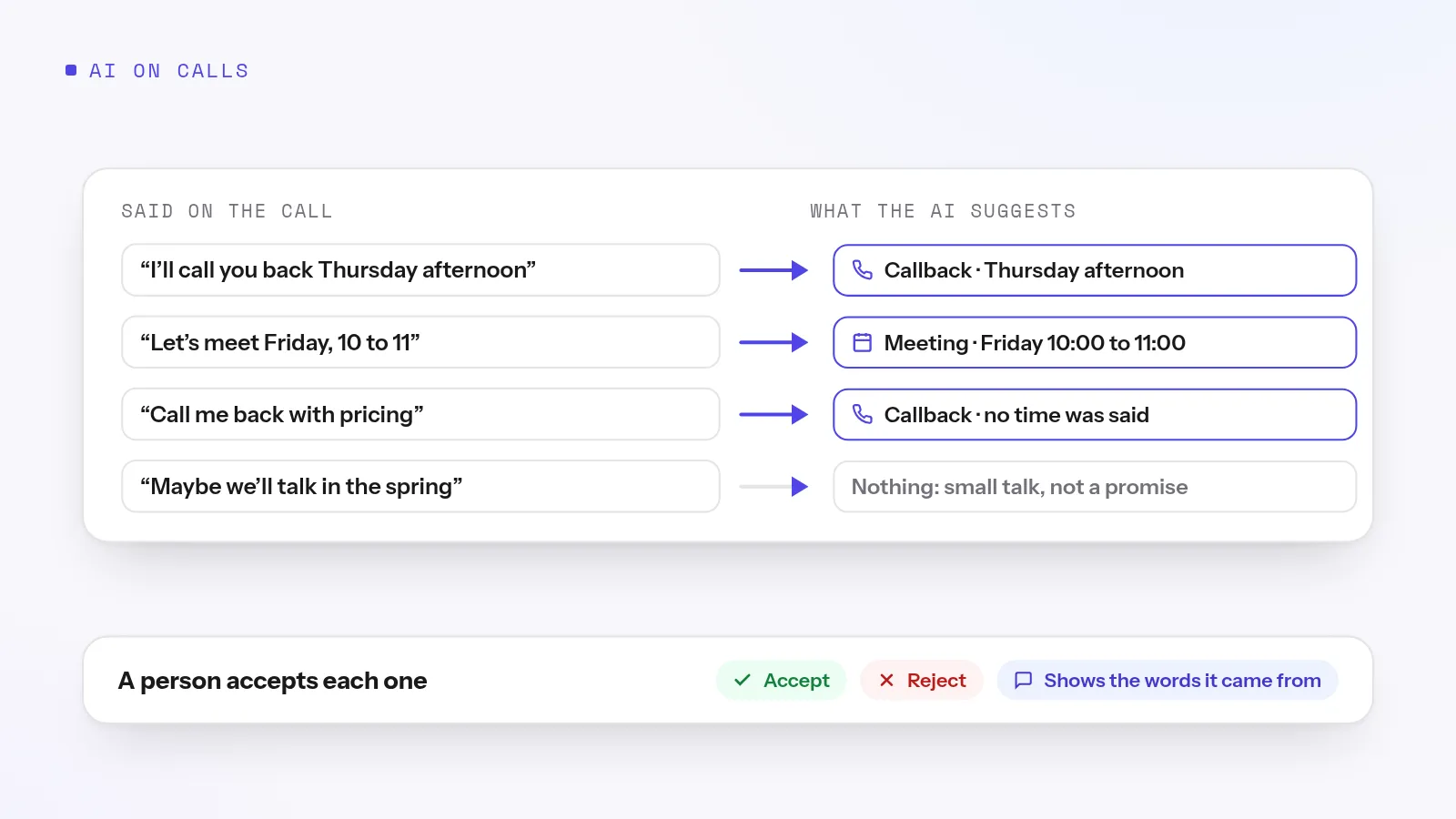
AI follow-up extraction reads a call and pulls out the next steps someone agreed to out loud, like "I'll call you Thursday" or "let's meet Friday at ten", and turns them into suggested tasks with the time that was said. The good versions don't guess dates, show you the words each suggestion came from, and wait for a person to accept it before anything lands on a calendar.
A promise made on the phone is only worth something once it's on someone's list. This post is part of our guide to AI phone calls, and it covers the step after the call ends: catching the follow-ups before they're forgotten.
Why follow-ups get lost
Reps make promises all day. Between back-to-back calls, a "call me after the board meeting" gets written on a sticky note, typed into the wrong field, or not written at all. The cost is quiet: the customer waits for a call that never comes, and a warm deal goes cold. Cutting the typing after each call is the theme of our post on reducing after-call work; follow-up extraction is one piece of it.
What AI follow-up extraction does
After a recorded call is transcribed, the AI looks for commitments: who promised what, and when. Most tools focus on two kinds.
Said on the call
What the AI suggests
What a good tool avoids
"I'll call you back Thursday afternoon"
A callback, due Thursday afternoon
Turning "sometime next week" into a made-up date
"Let's meet Friday, 10 to 11"
A meeting with that start and end
Filing a meeting as one more call to make
"Call me back with pricing"
A callback with no time
Guessing a day nobody said
"Maybe we'll talk in the spring"
Often nothing
Treating small talk as a promise
A call summary tells you what happened; follow-up extraction tells you what has to happen next. Our post on AI call summaries covers the first half.
Try it on your own numbers. On AI+ and Dialer Plus, get the callbacks and meetings promised on recorded calls on your own number, ready to accept.
AI misreads tone and context. A customer saying "call me Thursday" sarcastically, or a rep repeating what a competitor promised, can look like a commitment. That's why the safest design is a suggestion, not an automatic task: the rep sees what was heard and accepts or rejects it in a few seconds. You keep the time savings without filling calendars with tasks nobody meant.
What to look for in a tool
No invented dates. If nobody named a time, the suggestion should come without one.
The source words. Each suggestion should show the phrase it came from, so checking it takes seconds.
The right owner. The task should go to the person who made the promise, not a shared inbox.
The right record. It should land on the customer's record, so the next person sees it too.
A person in the loop. Nothing should be booked until someone accepts it.
Follow-up extraction in Adoptiv
After each analyzed call, SIYA, Adoptiv's AI, suggests the callbacks and meetings that were promised through follow-up extraction. Each one arrives with the time that was said, or none if nobody named one, and the words SIYA heard the promise in. Each suggestion waits up to seven days for someone to accept it; dismissing one hides it only for you.
Accepted, a callback becomes a task with its due date, and a meeting is created at the time that was said. It's assigned to the rep who took the call (or the person who accepted it if the call had no rep); a callback the customer asked for at a set time goes to the lead's owner. It's linked to the lead when a phone number on the call matches. From there it sits with the rest of your tasks and reminders. AI analysis, including call summaries, is included on your own number's calls on the AI+ and Dialer Plus plans.
Common questions
What is AI follow-up extraction?+
AI that reads a call and pulls out the next steps agreed on it, such as callbacks and meetings, and suggests them as tasks with the time that was said.
Does AI create follow-up tasks automatically?+
It depends on the tool. The safer design suggests each one and waits for a person to accept it. In Adoptiv, nothing is created until someone accepts it.
What if no date was mentioned on the call?+
A good tool leaves the date empty rather than guessing. The rep can add one when they accept the task.
Who gets the follow-up task?+
It should go to whoever made the promise. In Adoptiv that's the rep who took the call, or the person who accepted it if the call had no rep. A callback the customer asked for at a set time goes to the lead's owner.
Adoptiv is the dialer, the CRM and the AI on one platform, where the busywork logs itself and your reps just talk. Try it free for 14 days, with no credit card.
Questions? Call +1 (844) 955-7733. SIYA answers and puts you through to a person.