Business texting from your CRM means sending and receiving texts from a company number, with every conversation saved on the contact's record next to their calls and emails. It beats texting from personal phones because the whole team can see the thread, replies don't disappear when a rep leaves, and opt-outs are recorded where everyone can see them. Text only people who've agreed to hear from you, and keep messages short and useful.
Most leads would rather reply to a text than call back. The question is whether those texts live in your CRM or on a dozen personal phones. This post is part of our guide to a CRM with a built-in phone system.
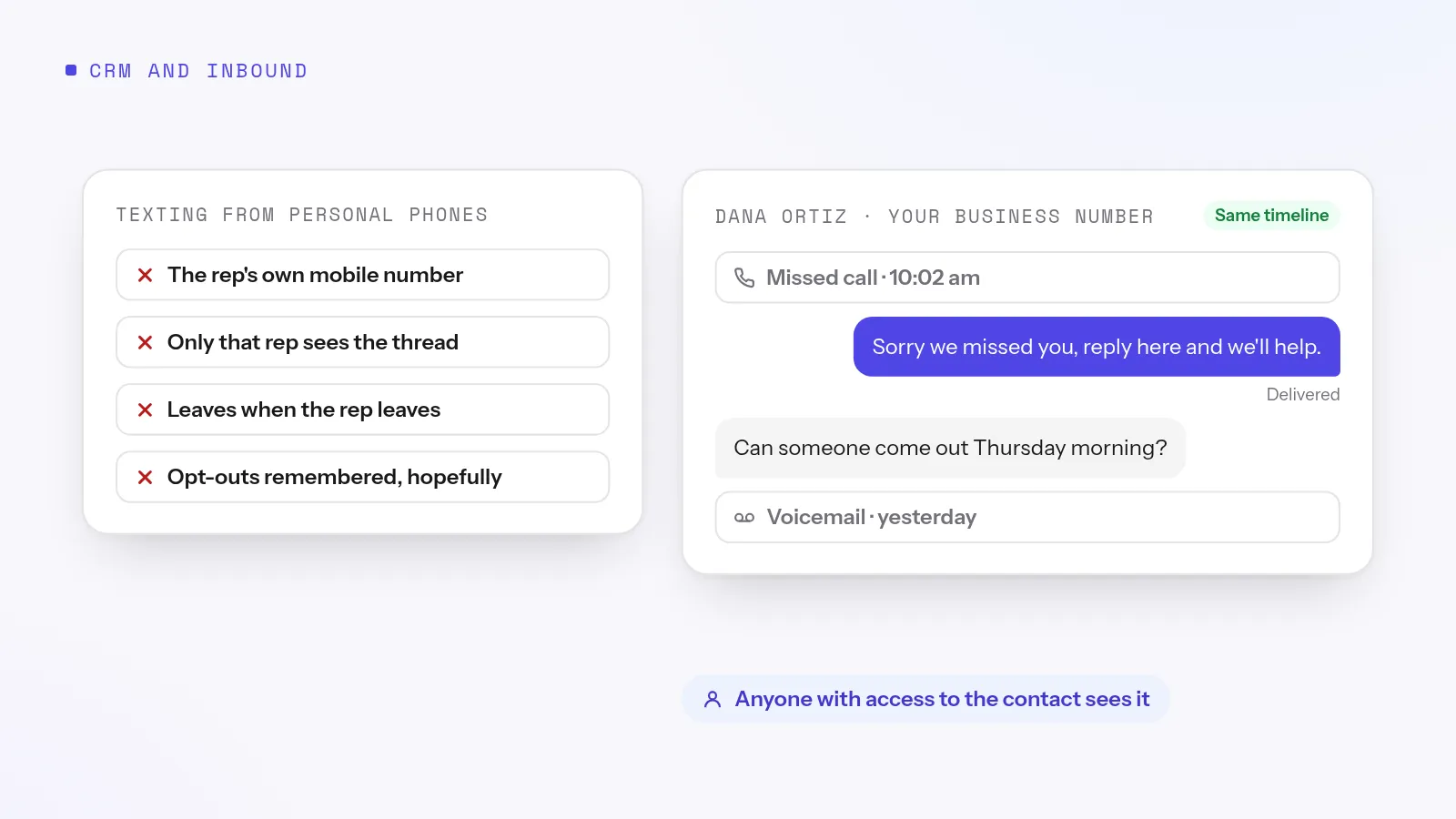
Personal phones vs CRM texting
Texting from personal phones
Texting from the CRM
Which number
The rep's own mobile
Your business number
Who sees the thread
Only that rep
Anyone with access to the contact
When a rep leaves
The conversations leave too
They stay on the record
Opt-outs
Remembered, hopefully
Recorded on the contact
Next to calls
In a separate app
In the same timeline
Where texting earns its place
Right after a missed call. "Sorry we missed you, reply here" turns a lost call into a conversation.
Confirming appointments. A short reminder the day before cuts no-shows.
Say who you are in the first few words, keep it to one or two sentences, and end with something easy to reply to, like a yes-or-no question or two times to choose from. Don't send links in a first text to a stranger; they look like spam. And reply quickly: a lead who texts back and waits an hour has usually moved on.
Rules to follow
US carriers require business texting numbers to be registered (10DLC), and marketing texts need the person's prior consent. Honor opt-outs every time, including replies like STOP, and keep texts within reasonable local hours. Some uses, such as third-party debt collection, debt relief and credit repair, are barred on most business texting routes whatever consent you hold. This is general information, not legal advice, so check with your own counsel.
Texting in Adoptiv
In Adoptiv you text from the same business number you call from, and each conversation is one thread between your number and theirs, whoever on your team replies. The thread joins a contact by matching any of four phone fields and appears in the contact's feed beside calls, voicemails and email (business texting). In the inbox, your outgoing texts show as sent, delivered or failed. A call flow can text the caller who just rang, and sequences can include text steps between emails and call tasks. 10DLC registration is handled for you, and a do-not-text field on the contact stops texts to that person.
Common questions
Can I text from my existing business number?+
Usually, if your provider supports texting on it and the number is registered for business messaging. Landlines and some toll-free numbers need extra steps.
Should reps text from their own phones?+
It's better not to. Conversations on personal phones aren't visible to the team, and they leave with the rep.
How fast should we reply to a text?+
Within minutes during business hours. Texts feel immediate, so a slow reply reads as no reply.
Can texting replace calls?+
For quick confirmations and scheduling, often. For a real sales conversation, use the text to set up the call.
Adoptiv is the dialer, the CRM and the AI on one platform, where the busywork logs itself and your reps just talk. Try it free for 14 days, with no credit card.
Questions? Call +1 (844) 955-7733. SIYA answers and puts you through to a person.