Running a call center across multiple locations: what to share and what to split
Adoptiv Team··Updated ·3 min read
Short answer
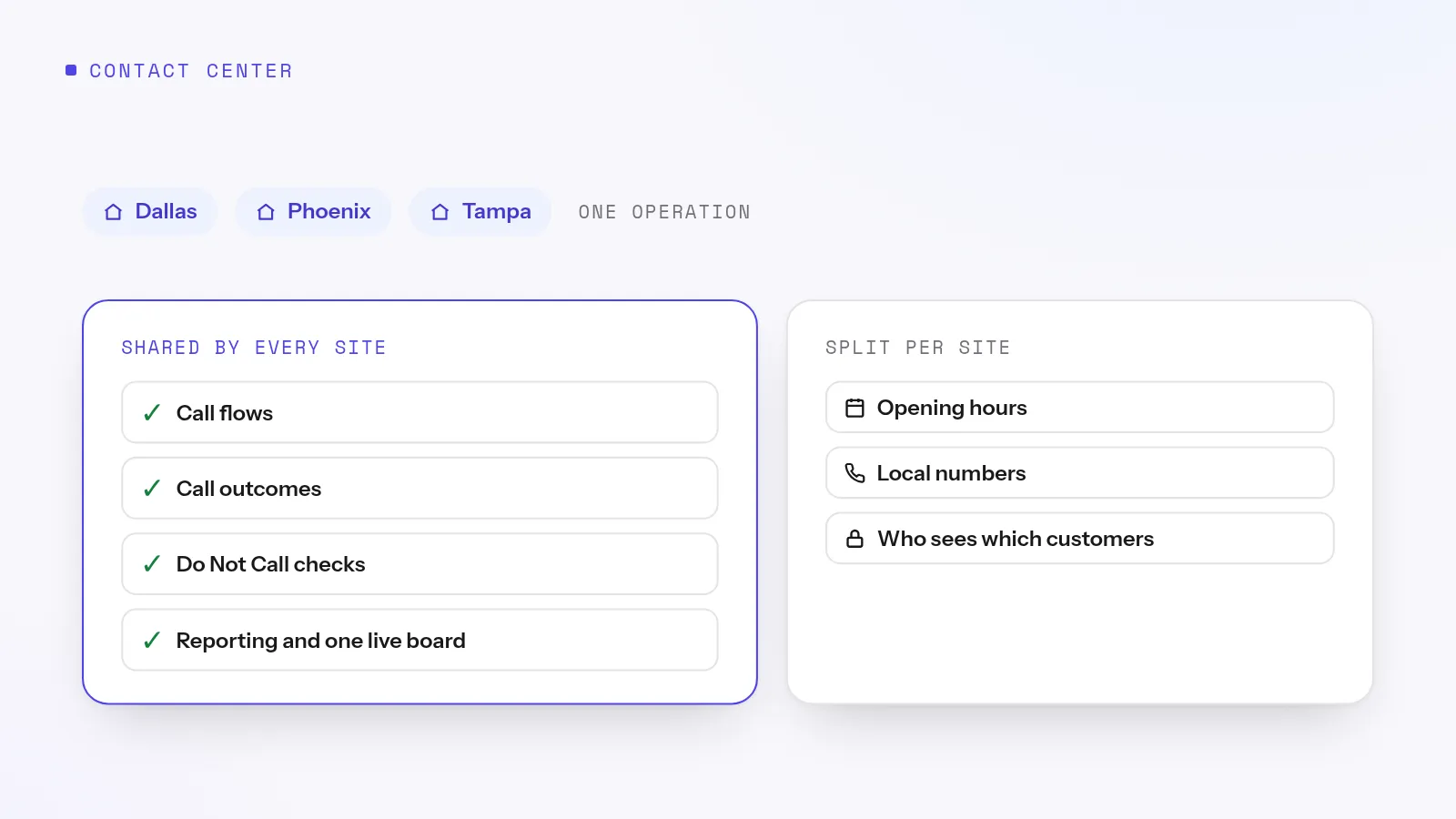
Run every site as one operation. Share the call flows, call outcomes, Do Not Call checks and reporting, so a caller gets the same experience in every office and a rep can move between sites without retraining. Split only what really differs: opening hours, local numbers, and which customers each region's team can see. Give head office one view of every live call, and let each site's supervisors coach their own teams.
A second office, or a group of remote reps, rarely breaks the phones. It breaks consistency. Each site copies the setup, tweaks it, and six months later the greetings, outcome codes and screening rules all differ, and nobody can compare one site's results with another's. This post is part of our Contact center software for small teams: the complete guide.
Share or split?
Item
Share across sites
Split by site
Call flows and menus
Yes, one version
Only where a site truly differs
Call outcomes (dispositions)
Yes, or reports can't compare
No
DNC and suppression lists
Yes, always
No
Business hours
If the hours match
When sites keep different hours
Phone numbers
Main line
Local numbers per region
Customer records
Managers and head office
Each region sees its own
Live monitoring
Head office sees every call
Site supervisors coach their own teams
Three rules for consistency
One owner for the setup. A single person or team publishes changes to flows and outcomes. Sites ask for changes rather than making their own.
Copies are the enemy. If a site needs one change, give it its own version of that one piece, not a copy of the whole setup.
Compliance never varies by office. A number one site blocked must be blocked for every site.
Run every site from one workspace. Share call flows and call outcomes across sites, give a site its own business hours, and let admins see every live call on one list.
Remote reps and a second office are invisible from the floor. A shared live view shows calls in progress, whoever is on them and wherever they sit, so the office that's swamped at 11 am is visible at 11 am. Pair it with per-queue and per-rep reports, and make sure each site's supervisors can join their own team's calls to coach.
How Adoptiv does it
In Adoptiv, call flows, hours and call outcomes are built once and shared by every site. Call flow changes are published as numbered versions, so every office runs the same one. A site with different hours gets its own business hours schedule, used in the Business Hours step of that site's call flows. Schedules are read in your organization's time zone, so write each site's hours in that zone.
Admins see every live call in the workspace on one list, which refreshes every 15 seconds (see live monitoring). Give site supervisors the Supervise calls permission to listen, whisper or barge on their own teams' calls. Roles and permissions follow your org chart: people see their own records, their team's, their region's or all of them, and a sharing rule opens one branch to another only where you choose. Your own Do Not Call lists block a number for every office. Manual calls are screened as they're placed. By default, power and predictive campaigns dial only leads screened in the last 30 days; a preview campaign still shows a listed or unscreened lead, with a warning, and the rep gives a reason before calling. Reps work from the browser or the Android app, on US local and toll-free numbers. Larger organizations can talk to us about Enterprise. See multi-site contact centers for the full setup, or BPO software for small call centers if your sites serve different clients, and how call routing works before you draw each site's flow. This is general information, not legal advice, so check with your own counsel.
Common questions
Should each office have its own phone system?+
Usually not. One shared system keeps call handling, screening and reporting the same, and lets reps move between sites.
Can each site keep its own hours?+
Yes. Give that site its own schedule and use it in the Business Hours step of that site's call flows.
How do supervisors monitor remote agents?+
In Adoptiv, admins see every live call in the workspace on one list. Site supervisors with the Supervise calls permission can listen, whisper or barge on their own teams' calls.
Can one region's team be kept from another's customers?+
Yes, with role-based access by team or region, opened to other branches only through sharing rules you set.
Adoptiv is the dialer, the CRM and the AI on one platform, where the busywork logs itself and your reps just talk. Try it free for 14 days, with no credit card.
Questions? Call +1 (844) 955-7733. SIYA answers and puts you through to a person.