Skip to content
Adoptiv

Contact center software for small teams: the complete guide

Adoptiv TeamUpdated 13 min read

Short answer

Contact center software decides what happens to every call your business gets: who it rings, what the caller hears while they wait, where it goes when nobody answers, and what you can learn from it afterward. A small team needs five things working before anything else: a greeting or simple menu, a queue with a wait limit and an exit, a ring strategy, after-hours handling and call recording. Live coaching, skills routing and callbacks come next, once the basics hold.

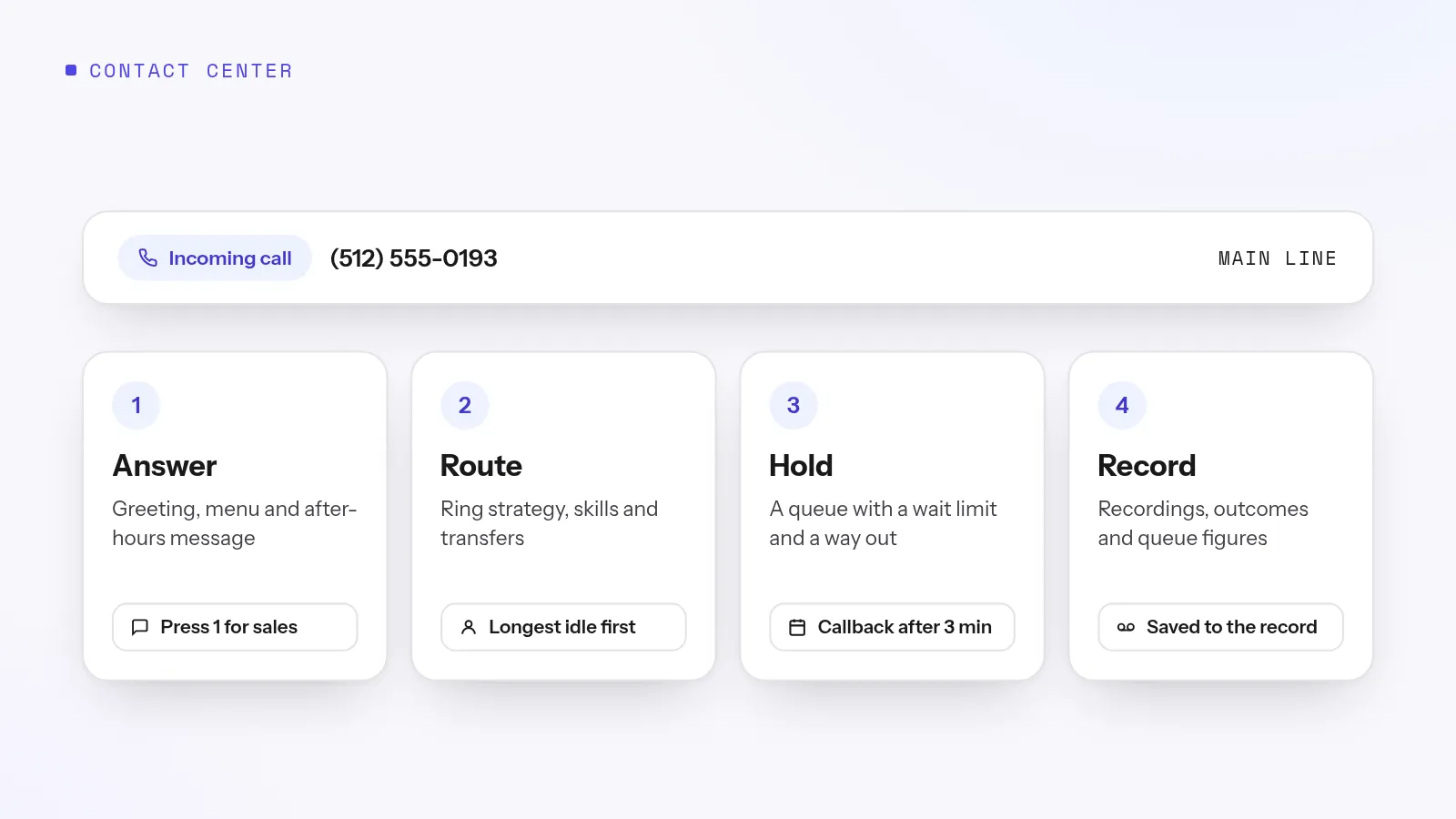
An incoming call passing through the four jobs of contact center software: answer with a greeting or menu, route by ring strategy, hold in a queue with a way out, and record.
On this page
  1. What contact center software actually does
  2. Greetings, menus and the auto attendant
  3. Queues and ring groups: where calls wait
  4. Ring strategies: who rings first
  5. Skills-based routing: the right person, not just a free one
  6. Transfers: handing a call on without losing it
  7. Callbacks and virtual hold
  8. After-hours and holidays
  9. Call recording
  10. Live monitoring: listen, whisper and barge
  11. Several locations, one phone system
  12. Reps on mobile
  13. What to set up first
  14. How to choose contact center software
  15. Where Adoptiv fits
  16. Every guide in Contact center

Most small teams don't decide to buy "contact center software". They notice a problem first. Calls ring out while two people are on the phone. A customer says they waited ten minutes and gave up. A new hire transfers a call to the wrong person and the caller hangs up. Someone asks who handled last Tuesday's angry call and nobody knows.

Each of those is a routing problem, and each has a setting that fixes it. This guide walks through the parts of a contact center in the order a small team usually needs them, with links to the deeper guides on each topic. The aim is a phone setup where every call has somewhere to go, every caller hears something sensible, and every rep knows what to do next.

What contact center software actually does

Strip away the vendor language and a contact center does four jobs. It answers: a greeting, a menu, a recorded message. It routes: decides which person or group rings, in what order, and for how long. It holds: keeps callers in line when everyone is busy, and decides when the wait has gone on long enough. And it records: keeps the call, the outcome and the numbers so you can check what happened.

Routing is the job most teams get wrong first; our guide call routing explained walks through every way a call can be sent and when each fits. A plain business phone line does the first job and maybe part of the second. That's why a team of three can run on one, and a team of eight usually can't. Once more calls arrive than there are free people, the gaps show up as missed calls, long waits and callers bounced between colleagues.

Job

What it covers

What breaks without it

Answer

Greetings, menus, after-hours messages

Callers don't know they reached the right place

Route

Ring strategies, ring groups, skills, transfers

The same two people take every call, or the wrong person does

Hold

Queues, hold music, wait limits, callbacks

Endless ringing, or callers hanging up mid-wait

Record

Recordings, outcomes, queue figures

No way to coach, settle a dispute or plan staffing

Greetings, menus and the auto attendant

The first seconds of a call set the tone. A short greeting that names the business and offers two or three choices beats a long menu every time. The rule of thumb: if a caller has to listen to more than four options, or press more than two keys to reach a person, the menu is doing too much.

The words "auto attendant" and "IVR" get used interchangeably, but they aren't quite the same. An auto attendant answers and routes by keypress ("press 1 for sales"). An IVR can do more, such as collect information before a person picks up. Our guide to auto attendant vs IVR explains which one a small team actually needs, and the IVR menu examples post gives seven phone tree scripts you can adapt, from a two-option sales and support split to a menu for several locations.

Two habits make any menu better. Put the most common reason for calling first, and always offer a way to reach a person, usually 0. Then listen to it yourself from a mobile phone, because a menu that sounds fine in a quiet office can be hard to follow on a noisy job site. If you're drawing the whole path a call takes, from greeting to queue to after hours, call flow builder: designing your first inbound flow walks through a first flow step by step.

Queues and ring groups: where calls wait

A ring group rings a set of phones and that's it: if nobody picks up, the call moves on or goes to voicemail. A queue holds the caller in line, plays hold music, and keeps trying the team until someone is free or a wait limit runs out. The difference matters most at busy times. Our guide to call queues vs ring groups covers when each one fits, but the short version is this: if callers ever arrive while everyone is on the phone, you want a queue.

The settings that matter on a queue are fewer than they look:

  • Wait limit. How long anyone may hold before the call leaves the queue. Five minutes is a common starting point; shorter for sales lines, where a caller who waits is a caller who's comparing you with someone else.
  • Where the call goes next. When the wait runs out or nobody is free, the call needs somewhere to go. Voicemail is the usual default, but another team or an outside number is often better.
  • What callers hear. A welcome, hold music, and an occasional announcement. Announcements should say something useful, like how to reach you online, not "your call is important to us" on a loop. Our guide to hold music and queue announcements has scripts and timings.

Always give the call a next step. A caller who reaches the end of the wait with nowhere to go is worse off than one who never waited at all. Our guide to overflow routing when every agent is busy compares the options: voicemail, a callback, a second team or an outside number.

Ring strategies: who rings first

Inside a queue or ring group, the ring strategy decides the order. The common ones:

  • Ring all. Every phone rings at once and the first person to answer gets the call. Best for small teams that want speed.
  • Round robin. Each call starts with the next person after whoever took the last one. Best when you want calls shared evenly. Our guide to round robin call distribution covers its variants and when it backfires.
  • Fewest calls. Whoever has answered the least rings first. Good for balancing a long shift.
  • Hunt (in order). Phones ring one at a time down a fixed list. Good when there's a clear first choice and a backup.

Pair the strategy with a short wrap-up gap, so a rep who just finished a call has a few seconds to write notes before the next one rings. Without it, notes get skipped and the next caller gets a distracted rep. The two basic choices, ringing everyone at once or one person at a time, are compared in ring strategy: simultaneous vs sequential ringing.

Skills-based routing: the right person, not just a free one

Once a team has specialists, such as a Spanish speaker, a billing expert or a senior closer, "whoever is free" stops being good enough. Skills-based routing tags people with what they can handle and sends each call to someone with the matching skill. Our guide to skills-based routing explains how it works and the point at which a small team needs it.

Our advice: start with fewer skills than you think. Two or three tags (language, product line, seniority) cover most teams. Every extra skill splits your team into smaller pools, and small pools mean longer waits. Always set what happens when nobody with the skill is free: wait a little longer, or fall back to anyone.

Transfers: handing a call on without losing it

A bad transfer undoes a good conversation. The caller repeats themselves, the colleague is surprised, and trust drops. There are two kinds. A cold transfer sends the call straight on. A warm transfer lets the rep speak to the colleague first, explain the situation, and then connect everyone.

Warm transfers take a minute longer and save far more than that in goodwill, especially for complaints, larger deals and anything where the caller has already explained a lot. Our post on warm vs cold transfers has scripts for both, including what to say when the colleague doesn't pick up. When a call has to wait on your side while you check something or find the right person, call park and hold explains the difference and when each one fits.

Callbacks and virtual hold

Nobody enjoys hold music. A queue callback (sometimes called virtual hold) lets a caller who has waited a while press a key, hang up, and get a call back when someone is free. The caller keeps their place without listening to the same track for ten minutes, and you lose fewer callers at peak times.

Callbacks only work if someone actually returns them, quickly and in order. Decide who owns the list before you switch the feature on. Our guide to queue callbacks covers how they work, when to offer them, and scripts for the offer and the returned call.

After-hours and holidays

A call outside business hours is still a lead or a customer with a problem. The worst outcome is a phone that rings forever or a full voicemail box. Business hours and holiday schedules let the phone system switch automatically: a closed message, a voicemail box that someone checks first thing, an on-call number for emergencies, or an answering service. If voicemail is part of your setup, voicemail transcription and voicemail to email covers getting messages read and answered fast.

Our post on after-hours call handling lays out five setups with greeting scripts for each. Whichever you pick, put the holidays in at the start of the year; holiday call routing has a calendar and a closed-day greeting to copy. The most common after-hours failure isn't a bad setup; it's forgetting that the office is closed on the Friday after Thanksgiving.
Try it on your own numbers. Calls and customers in one place: call flows, queues, routing and live coaching in the same app as your CRM.

Start Free Trial

Call recording

Recording is how you settle disputes, train new people and find out why a deal went sideways. It's also the raw material for everything in our call center metrics and coaching guide. Our post on business call recording covers what to record, how long to keep it, and how to actually use recordings rather than letting them pile up.

Recording rules depend on where you and your callers are. Some states require every party's consent, so most teams play a short "this call may be recorded" message at the start of every call. This is general information, not legal advice, so check with your own counsel.

Live monitoring: listen, whisper and barge

Recordings tell you what happened. Live monitoring lets you change what happens. A supervisor can listen silently, whisper to the rep without the caller hearing, or barge in so everyone hears them. Whisper is the coaching mode: a quiet "ask about their timeline" can save a call that's drifting.

Use it sparingly and tell your team it exists. Monitoring that feels like surveillance makes reps stiff; monitoring that feels like backup makes them braver. Our guide to call whisper vs barge explains when to use each mode.

Several locations, one phone system

A business with two offices, or reps working from home, faces a choice: share one queue across everyone, or give each location its own. Sharing means callers reach whoever is free, wherever they are. Splitting means local knowledge and local hours. Most teams end up with a mix: a shared main line with a menu option for each location, and separate queues where the work is genuinely local.

Our guide to running a call center across several locations covers what to share, what to split, and how to keep reporting comparable across sites. Inside one office, short extensions let people reach each other without the main number; phone extensions for small business covers how to set them up.

Reps on mobile

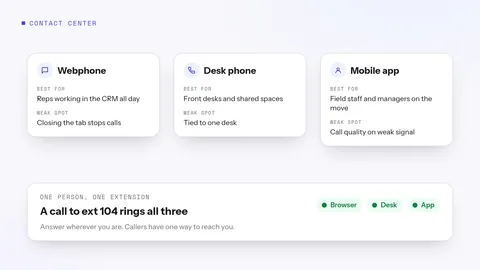
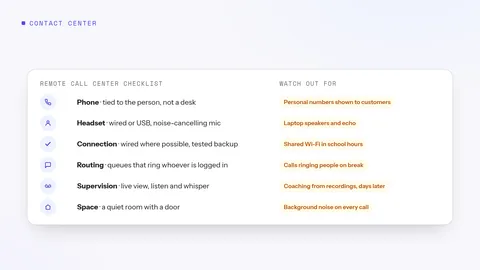
Not everyone sits at a desk. Field staff, owners and part-time reps need to take and make business calls from their own phones without giving out their personal number. A business phone app does that: calls show the business number, and they're logged like any other call. Our post on a business phone app for Android explains how to run a second number without a second SIM, and webphone vs desk phone vs mobile app compares the three ways to take calls. For a whole team working from home, see remote call center setup.

What to set up first

If you're starting from a single phone line, this order works for most small teams:

Week

Set up

Why now

1

Greeting, simple menu, one queue with a wait limit and a next step

Stops calls ringing out and callers getting stuck

1

Business hours and holidays

Stops after-hours calls disappearing

2

Recording and a consent message

Gives you something to coach from

2

Ring strategy and a habit of notes between calls

Shares the load and protects notes

3–4

Warm transfer habits, callback offer

Fewer lost callers at busy times

Later

Skills routing, live coaching routine

Once you have specialists and a supervisor

What to skip at the start: elaborate menus, a dozen skills, and wallboards nobody looks at. Each one adds setup time and rarely fixes the problem that made you look for software in the first place.

How to choose contact center software

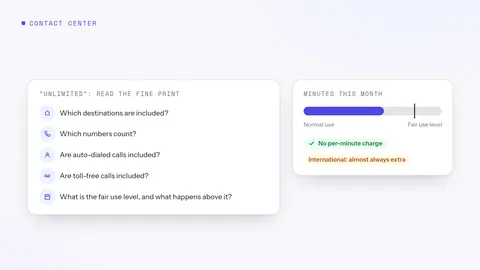
Feature lists all look alike. These questions separate the tools that fit a small team from the ones built for 500-seat floors: If a plan promises unlimited calling, read unlimited calling business plans: what fair use means before you compare prices.

  • Can you change routing yourself? If a menu change needs a support ticket, you'll stop improving it.
  • Does every exit have a setting? Ask what happens when the wait runs out and nobody is available. "It goes to voicemail" isn't always the answer you want.
  • Is the phone system tied to your customer records? When a call arrives, the rep should see who it is. When it ends, the outcome should land on that customer's record without copying.
  • What does a seat include? Numbers, minutes, recording and routing are sometimes sold separately. Add them up.
  • How are permissions handled? Who can change routing, listen to recordings or join live calls should be a setting, not a favor.

Where Adoptiv fits

Adoptiv puts the phone system and the CRM in one place, so a call and the customer record it belongs to are never in two different tools. On the contact center side:

  • Call flows with greetings, menus, business hours and queues are built by drag and drop in the call flow builder, on every plan.
  • Queues have a wait limit (300 seconds by default) and a service-level target, 60 seconds by default. Where a call goes next is set in the call flow around the queue: a timeout path for when the wait runs out, and a separate step that catches repeat callers (three calls in 30 minutes by default). See call queues.
  • Six ring strategies, including ring all, round robin and fewest calls, set on the queue, with each ring attempt lasting 30 seconds by default. See ring strategies.
  • Skills-based routing is switched on per queue. In the call flow, a Match VIP Caller step can send your most important callers down their own path.
  • Listen, whisper and barge start from the live calls page. Workspace admins can join any call; anyone else needs "Supervise calls" in their permission set, and reaches only the people on the teams they manage or who report to them. See listen, whisper and barge.

Every guide in Contact center

Common questions

What is contact center software?

It's the software that handles a business's calls end to end: answering with greetings and menus, routing calls to the right people, holding callers in queues when everyone is busy, and recording calls and outcomes. Many tools also cover texts and other channels.

Do small teams need contact center software, or is a business phone line enough?

A phone line is enough while calls rarely overlap. Once callers regularly arrive while everyone is busy, or you need after-hours rules, recording or transfers, you need queues and routing, which is what contact center software adds.

What's the difference between a call center and a contact center?

Traditionally a call center handles phone calls only and a contact center adds other channels such as text and email. For a small team the line is blurry; what matters is whether calls and messages land on the same customer record.

How long should callers wait in a queue?

Set a limit, then an exit. Many teams start at about five minutes and shorten it for sales lines. Offering a callback before the limit keeps more callers than a longer wait.

Which ring strategy should a small team use?

Ring all is the simplest: every phone rings and the first to answer takes the call. Switch to round robin or fewest calls when some reps end up taking far more calls than others.

When do we need skills-based routing?

When some calls need a specific person, such as a language, a product line or a senior rep. Start with two or three skills and set a fallback for when nobody with the skill is free.

Should we record every call?

Most teams do, because the calls you didn't record are often the ones you need. Play a consent message at the start, and check the rules for the states you call. This is general information, not legal advice, so check with your own counsel.

Is live call monitoring the same as recording?

No. Recording keeps the call for later. Live monitoring lets a supervisor listen, whisper to the rep or join the call while it's happening.

ShareLinkedInXEmail

About Adoptiv

Adoptiv is the dialer, the CRM and the AI on one platform, where the busywork logs itself and your reps just talk. Try it free for 14 days, with no credit card.

Questions? Call +1 (844) 955-7733. SIYA answers and puts you through to a person.

Citing this article

Adoptiv Team. “Contact center software for small teams: the complete guide”. Adoptiv Inc, November 20, 2026. Retrieved from https://adoptiv.com/blog/contact-center-software-guide

Have questions?

or email [email protected]

Free trial

Try It on Your Own Numbers.

Calls and customers in one place: call flows, queues, routing and live coaching in the same app as your CRM.

14-day trial · no card · migration included