Call flow builder: designing your first inbound flow
Adoptiv Team··Updated ·2 min read
Short answer
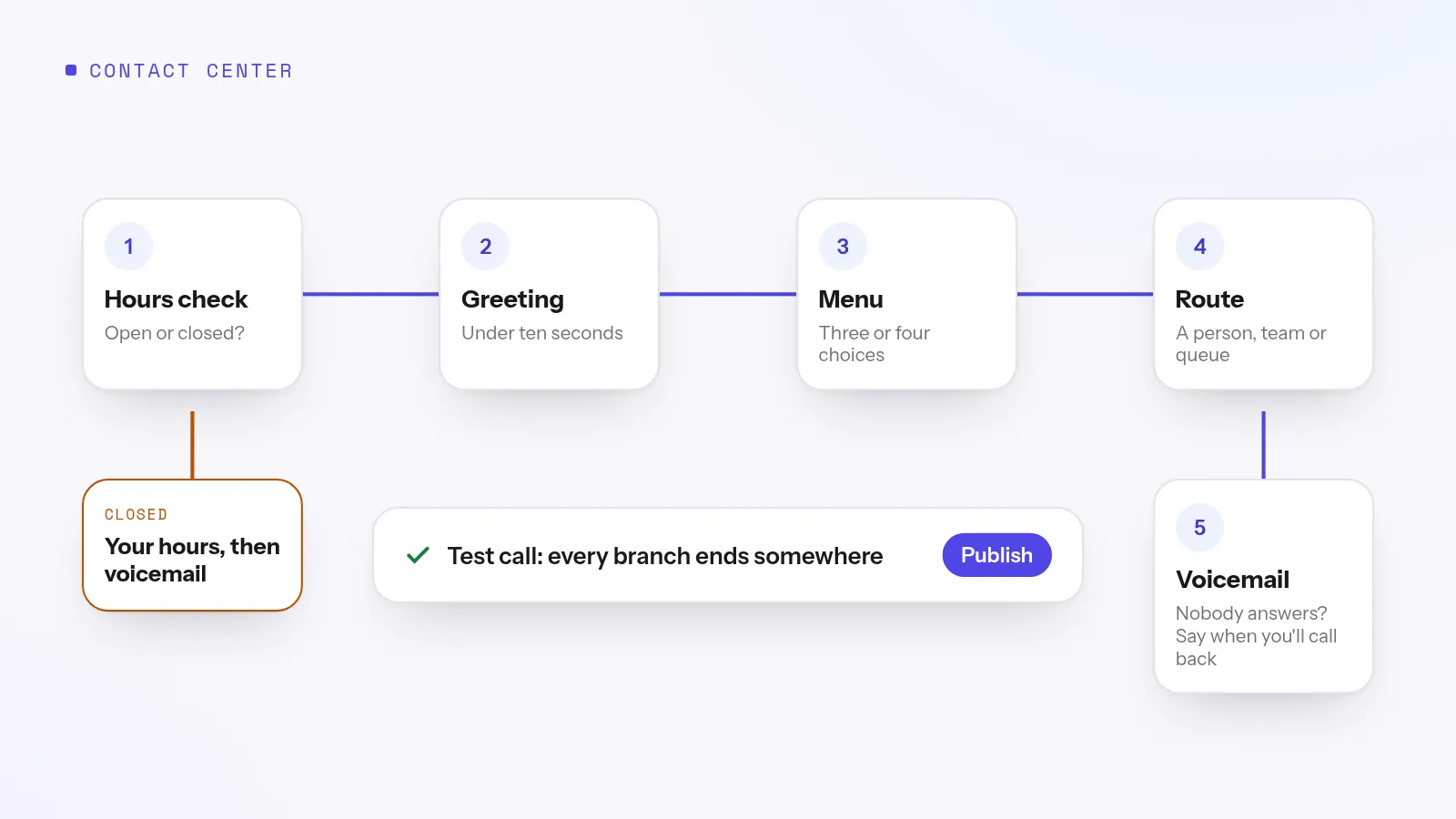
A call flow builder lets you draw what happens when your number rings: check the hours, play a greeting, offer a menu, send the call to a person or queue, and catch everything else in voicemail. A good first inbound flow has five steps and fits on one screen. Start from a template, make sure every branch ends somewhere, and walk a test call through it before you publish.
Under ten seconds; skip the "your call is important"
3. Menu (optional)
Lets the caller choose
Three or four choices, most popular first
4. Route
Rings a person, team or queue
Decide what happens if nobody answers
5. Voicemail
Catches what's left
Say when you'll call back
Many small businesses don't need a menu at all. If most callers want the same team, send them straight there; see IVR menu examples for when a menu helps.
A worked example
A five-person service company with one main number might build this:
Holiday? Play "We're closed today", then voicemail.
Open? Greeting, then a menu: 1 for new bookings, 2 for existing jobs.
1 rings the sales queue; 2 rings the service team.
Nobody answers within two minutes? Voicemail, with a callback promise.
Closed? A short message with your hours, then voicemail. Our guide to after-hours call handling has more options.
Try it on your own numbers. Start from a template, walk a simulated call through it, and publish when it's right.
Dead ends. Every branch, including "pressed nothing" and "pressed the wrong key", needs somewhere to go.
Endless ringing. Put a time limit on every queue or ring group, with a next step after it.
Too many layers. A menu inside a menu loses most callers. Keep it flat.
No way to a person. Always offer one, even if it's "press 0".
Testing on customers. Run a test call before you publish, and again after any change.
For the bigger picture of how calls get to the right person, read call routing explained.
Building it in Adoptiv
Adoptiv's call flow builder is a canvas you drag steps onto, or you can start from one of 15 templates, including an auto-attendant, a queue and an after-hours flow. Business hours are read in your organization's timezone. A menu step has its own exits for no key and a wrong key, and a queue plays hold music while it rings your agents. One flow can hand a call to another, so a shared after-hours path is built once. Before you publish, Simulate walks a pretend caller through the flow in your browser and shows the path it took; no real call is placed. Each publish is a numbered version: calls already in progress finish on theirs, and you can restore an earlier one. Call flows are included with every seat.
Common questions
What's the difference between a call flow and an IVR?+
An IVR is the menu callers press keys in. The call flow is the whole path around it: hours, greetings, the menu, queues and voicemail.
How long should the greeting be?+
Under ten seconds. Say the business name and get to the choices or the ring.
Should every number have its own flow?+
Not necessarily. Several numbers can share one flow; give a number its own only when its callers need a different path.
How often should I review my flow?+
Whenever hours, teams or services change, and once a quarter otherwise. Listen to a few calls to hear where callers get stuck.
Adoptiv is the dialer, the CRM and the AI on one platform, where the busywork logs itself and your reps just talk. Try it free for 14 days, with no credit card.
Questions? Call +1 (844) 955-7733. SIYA answers and puts you through to a person.